Showing posts with label photos. Show all posts

Wednesday, October 16, 2024

How To Design Your Own Wedding Postcards

Instead of buying a post card to stick in each of your wedding welcome bags (which can add up and add an extra expense to your wedding), you can design your own wedding postcards and print them on photo paper.

Find more tips to save with all of our ways to save money posts.

UPDATE: Now is the time to design your own wedding postcards and print them. You can get 20 FREE 4×6 photos with the code WOW20 at Walgreens on October 16, 2024 from 2 pm to 4 pm EST. Choose instore pickup to save on shipping too.


Adding wedding postcards to your wedding welcome bag is a great idea. Find out how to make your own at www.abrideonabudget.com.

When my friend Mallory got married in Washington, it was similar to ours in that it was a destination wedding for everyone except, basically, the bride and groom. So she had a similar situation where she had to make a ton of wedding welcome bags for the out of towners.

When I was making our wedding welcome bags, she suggested that I attach a postcard from our town to the bags. Well, quick math told me that at $.35 a postcard for 100 bags would run me $35 plus tax. I had to come up with a cheaper alternative.

And that's when it hit me. I would design my own wedding postcards.


 How To Design Your Own Wedding Postcards

I'm pretty creative on the computer. I mean, I do run two blogs for a living and spend much of my time designing images online.

But at the time, I wasn't that great.

I actually designed two wedding postcards. One from my phone and the other on the computer. The second one was so much better than the first. So, if you have a desktop, use that.

Adding wedding postcards to your wedding welcome bag is a great idea. Find out how to make your own at www.abrideonabudget.com.

I took a photo when we were at a local beach and was in love with it. Our really eye-catching (yet simple and logo-less) umbrella hangs over the beach on a perfect day, with a bit of waves but not enough for children or surfers. There was a build up of sea junk that makes it look like I placed it there. There's nothing distracting in the background, not a cloud in the sky or a rogue person in the background. It looks, well, it looks sort of like a postcard.

And since our wedding was at the beach, since that's where we live, this was perfect. If you live in New York City, consider going out and taking a photo of the Empire State Building. Getting married in San Francisco? Snap a pic of the Golden Gate Bridge.

Not sure what exactly your town is known for? Stop into a souvenir store and check out the postcards. Figure out what landmarks and shots are used and replicate that on your own.

Then, go to a design website. Both Canva.com and PicMonkey.com are free, so those are good options.

Make sure to start with a 4x6-inch template. I would recommend 800x1200 pixels, at minimum, so you can make sure they don't print grainy. And if you start them at a 4:6 ratio, you can print them as 4x6 prints, which are often free (like right now!).

I added text that says, "Welcome to North Carolina for Lisa & Pete's wedding" in a large, dark font. I put this right in the middle of the picture because I thought it would get lost at the top or the bottom. To jazz it up a little more, I added the words Post Card at the bottom. And, to personalize them, I added our wedding month and year up top.

I made them up myself, but I'm sure you could find a free wedding postcard template out there somewhere if you didn't feel like you could make them on your own.

Since I made sure to pick a really clutch photo, it doesn't actually look like I made it myself. I mean, yes, it's personalized so you know I made it, but it looks like I ordered them.

Adding wedding postcards to your wedding welcome bag is a great idea. Find out how to make your own at www.abrideonabudget.com.

If you want, you can add handwritten note onto the back since you have a blank canvas for it.

If you choose to do that, I would recommend a felt tip pen. A regular ball point would run the risk of indentation. If you push too hard, you'll be able to see the lettering from the front of the print. A felt pen would eliminate this issue, however, be careful to let it dry before stacking these or affixing them anywhere. You don't want the ink to bleed. Or, to be perfectly safe, you can just leave the backs blank.

Then, affix them to your wedding welcome bags.

BRIDAL BABBLE: Would you make these wedding postcards?

Tuesday, February 11, 2020

DIY Photo Banner

Update: Right now, you can get a free 8x10 print from CVS with the code CUPID. It's a good time to print out the main photo for this DIY photo banner.

I love pictures. I had so many on my last phone that I had to delete an app or two if I wanted to take any more pictures. Really, my dinosaur of a phone was basically an oversized SD card.

I think a lot of people are like that too.

But, lots of photos on your phone comes in handy when you're planning your wedding and can quickly open a photo app and print pictures to create a DIY photo banner.

Want something fun to hang at your wedding reception? Make this BEAUTIFUL -- and easy -- DIY Photo Banner by www.abrideonabudget.com. Plus, it comes with a FREE Kate Spade-esque "Every love story is beautiful but ours is my favorite" photo printable.

DIY Photo Banner


I've seen this done two ways. You can either print pictures of you as a couple or you can print photos of each of you growing up until now. The latter is really cute if you met each other later in life. That way, your family and friends can see your fiance as a child and vice versa. If you have grown up together, photos as a couple works better because then you're giving your guests a glimpse into your life.

Want something fun to hang at your wedding reception? Make this BEAUTIFUL -- and easy -- DIY Photo Banner by www.abrideonabudget.com. Plus, it comes with a FREE Kate Spade-esque "Every love story is beautiful but ours is my favorite" photo printable.

What You'll Need:

What You'll Do:

Print your photos. 

Want something fun to hang at your wedding reception? Make this BEAUTIFUL -- and easy -- DIY Photo Banner by www.abrideonabudget.com. Plus, it comes with a FREE Kate Spade-esque "Every love story is beautiful but ours is my favorite" photo printable.

Hang the fabric on a wall in your venue. I used a chair sash and hung it with Command hooks (using a quick knot) since you can pull them down without leaving behind holes.You could go with something like jute cording, but I would worry about the clothespins slipping during the reception and you having photos all over the floor by the end of the night.

Quick aside: Be sure to double check that you're able to do this. Venues have their own rules about hanging things. So before you spend money printing photos, ask your venue if it's okay to hang -- and how they advise you do it.

Want something fun to hang at your wedding reception? Make this BEAUTIFUL -- and easy -- DIY Photo Banner by www.abrideonabudget.com. Plus, it comes with a FREE Kate Spade-esque "Every love story is beautiful but ours is my favorite" photo printable.

Affix clothespins to each of the photos. You want clothespins instead of anything that involves glue, especially if you borrowed these from baby books.

Attach the clothespins to the fabric ribbon. Put the "Every Love Story Is Beautiful But Ours Is My Favorite" free printable in the middle and scatter the other photos around it.

Want something fun to hang at your wedding reception? Make this BEAUTIFUL -- and easy -- DIY Photo Banner by www.abrideonabudget.com. Plus, it comes with a FREE Kate Spade-esque "Every love story is beautiful but ours is my favorite" photo printable.

Now, about that printable. I actually made it for you already so you don't have to. Just click the image below, save it to your computer, and then print it as an 8x10. I would print it somewhere like Walgreens photo instead of at home, so it's on photo paper, matches the other photos, and doesn't waste all your ink.

Want something fun to hang at your wedding reception? Make this BEAUTIFUL -- and easy -- DIY Photo Banner by www.abrideonabudget.com. Plus, it comes with a FREE Kate Spade-esque "Every love story is beautiful but ours is my favorite" photo printable.

BRIDAL BABBLE: Would you make this DIY photo banner for your wedding?

Monday, November 18, 2019

Should You Take Engagement Photos?

When we were living in New York, Pete and I went to Wave Hill , a gorgeous park close to his house. We walked around the gardens, through the woods, looked at the bridge and the river, and at the end, we both said this is where we'd take our engagement photos.

That was just wishful thinking at that point because we weren't engaged then. 

We did get engaged (obviously), but we ended up not taking our engagement photos in Wave Hill because we moved to North Carolina before he proposed. We did take them at a beach close to our home in North Carolina.

But they question remains: Should you take engagement photos?
Have you been thinking about taking engagement photos? Before you do, check out this post on www.abrideonabudget.com.
My friend Mallory, who got married in July 2012, got hers done too, and I borrowed some of hers for this post.

Should You Take Engagement Photos? 


The Pros For Taking Engagement Photos:
Engagement photos are a really nice way to capture how you look at the time of your engagement. In ten, twenty, fifty years, it will be so sweet to look back and see how in love and how young you were. Pictures are a great way to capture a moment and for that, I'm always for them.

And there are a lot of fun engagement photo ideas out there now: from a beach to a park to just showing your personalities. So it could actually just be a fun day to spend together.

Even better, taking engagement photos is a good excuse to test out your photographer. It also helps you get comfortable with them, which could do wonders for you being comfortable around them on your wedding day.

Reasons For Not Doing Engagement Photos:
If you take engagement photos, you can then use them for your Save the Date cards. But, realistically, you use one photo for the save the date and that's it. So to spend about a hundred bucks on one photo, that's silly to me, especially if you're planning your wedding on a strict budget.

So, if it doesn't fit into your budget, you should skip them. Or, do what we did. To save, we actually ended up taking them with a new photographer who was looking for photos for her portfolio. She didn't charge us, but we did tip her because I didn't feel right not giving her any money for her time.

We ended up using just one photo from the shoot for our save the dates and on a canvas print to hang in our bedroom. Other than that, I'm not sure what engagement photos are for, to be honest. I made wedding confetti out of a few of them, just to get more use out of our photos. You could put together our DIY photo banner with them. But other than that, you're just pushing it.

Have you been thinking about taking engagement photos? Before you do, check out this post on www.abrideonabudget.com.

When Should You Take Engagement Photos?
There's no strict timeline for when to take engagement photos. We took ours seven months after we got engaged, mostly because we didn't want it to be freezing cold on the beach when we took our photos. That was 14 months before our wedding.

You just want to make sure you take your photos after you get engaged, but before you need them. If you are planning on using them for your save the dates (which you mail out a year beforehand for a destination wedding and six months before a local wedding), use that as a factor for when you should take them. Also, double check the photographer's turn around time before booking them because you don't want to wait three months for these, like you can wait for your wedding photos.

Do You Need To Take Engagement Photos?
You don't need to do anything.

We took a selfie the day we got engaged, and that's what I used for our engagement party invites. Good enough for me.

wedding invitations

And, if you did take your photos already, you're in luck. Right now, you can get a free 8x10 at Walgreens. You can upload a photo, add it to your cart, and enter the code EIGHT10 at checkout. Choose in store pickup and your photo will be completely free. The code is valid through today, November 18, 2019, so don't miss it.

BRIDAL BABBLE: Did you get engagement photos professionally taken?

Need help with your engagement photos?

Check out our Engagement Picture Tips post.
engagement-picture-tips

Wednesday, January 17, 2018

5 Ways To Share Your Wedding Photos

When we got our wedding photos back, we had over 1,300 photos. Those were the touched up, edited, good versions of our photos. I can't even imagine how many there were when you add in the raw photos.

But even with 1,300, it was near impossible to print them all and mail them to our parents. Those would be such heavy envelopes to mail. You want to get the photos to your families, though, so I came up with a few ways help you share.

#ad How are you sharing your wedding photos? Get ideas in this 5 Ways To Share Your Wedding Photos from www.abrideonabudget.com.

5 Ways To Share Your Wedding Photos


1. Google Drive.
When we went to Japan, we took a ton of photos. Pete took the photos, loaded them to his computer, and put them on Google Drive. Everyone who had the link was able to edit and add their own photos. That way, we could all share our photos. And anyone who didn't have photos were still able to access the link and download whatever they wanted.

You can do the same with your wedding photos. Create a link on Google (or something similar) and add it to your wedding website. Make it so anyone with the link can edit, so every one of your guests will be able to add their own photos. Then, everyone can download their favorites and do with them as they please.

2. Prints.
When we sent out thank you cards, we included one photo in every card. I went through all our photos and found one photo of every friend/couple. I had them printed and put one photo print in every card. That way, our friends and family who came to the wedding but didn't have access to our professional wedding photos were able to see at least one photo of themselves.

They were also able to see photos of us. I put a few of my favorite photos on our thank you cards. One was from the ceremony, two from downtown, and one from the reception. So, if our guests missed any part of our day, they were able to see it in photos.

For other people (our parents, and those who really helped us out), I actually gifted them prints in frames. I only put frames on dressers and shelves, not on walls. If you are sharing photos with someone like that, go with either smaller frames or canvas wraps.

#ad How are you sharing your wedding photos? Get ideas in this 5 Ways To Share Your Wedding Photos from www.abrideonabudget.com.

3. Custom USB Drive.
This one is very similar to what we did. We got our photos on a custom USB drive from our photographers. Our names and wedding date were printed on the outside and our photos were loaded to the drive. It was in a box with our photographers' logo on it. I. Was. Floored. I had never seen something like this before and I thought it was incredible.

When it was time for us to share the photos with Pete's dad, we picked up a standard USB drive and loaded the photos on to it. But, oh how I wish I could have made it a little more special.

So you wouldn't believe how I felt when I learned about Artsy Couture recently and, guys, the boutique photo lab sells custom USB drives. You can add your own photos to the drive itself (horizontal photos are recommended) when you order it. When it arrives, you can load it with all your wedding photos. You can choose either an 8GB or 16GB drive, but I recommend getting the larger one. High-res photos take up a lot of room, so you want to get one that can hold all your photos. You can also choose premium acrylic, premium wood, or standard white. Plus, you can add a customize presentation box, which makes for a great gift idea.

4. Photo Books.
Our wedding photographer gave us a book of photo proofs with our USB drive. Each photo was labeled with the same file name as the photo on the USB drive so it was easy to figure out which was which.

When my mom was in town after we got married, I let her look at the book of photo proofs. She wrote her favorites down, then I downloaded them in a file from the USB drive to create a photo book for her. She wrote down a separate list for a photo book for my grandma too, so I made her a book as well. It was a great way to narrow down the photos and show my grandma photos that she would care about. She was able to see all her grandchildren and friends in her photo book and didn't have to skip through photos of our friends and anyone she didn't know to get to the photos she wanted to see.


5. Social Media.
If you have time to upload a ton of photos, social media is a great option. I only uploaded a handful of ours, but I don't use Facebook that often. Some of my friends upload hundreds of their wedding photos, and I just love it -- especially if I wasn't able to make it to the wedding. Being able to see photos from when the couple is getting ready until when they're leaving the reception, it really makes you feel like you're there.

If your album is public, your friends will be able to tag themselves and share the photos that they want to their own timeline. That way, they'll have them easily accessible when they want to print them.


BRIDAL BABBLE: What ways are you planning on sharing your wedding photos?

Wednesday, August 30, 2017

Entertaining Your Guests With An I Spy Game (and free printable)

I've been to a lot of weddings where they had disposable cameras on the tables. And, usually, they just sit there. I mean, everyone has their own cameras, iPhones, photographic memories. No one wants to pick up your antiquated disposable camera and take photos for you.

You hired a photographer. Leave it up to them.

Except, well, I wanted people to pick up those disposable cameras and take photos for me. I thought it would be amazing -- and sure, a throwback to 1994, but that was a great year. I was thrilled that the Rangers won the Stanley Cup and the World Cup was going on that summer. Both things that I distinctly remembering happening in 1994 but did not watch one single minute of.

Strange the things we remember.

For the things we don't remember, we capture them on film. See, you need people to take photos at my wedding, so invite James Bond*. Or, well, your guests in the form of James Bond.

Create an "I Spy" card.

Need a way to entertain your wedding guests? Give them a disposable camera and this "I Spy" game. You can print it for FREE at www.abrideonabudget.com.

You display a card at each table or at the welcome table, along with disposable cameras, and ask your guests to capture the moments listed on the card, like the groom playing with his ring; the bride and her mom dancing; the cutest couple other than the bride and groom; the worst dancer in action.

Super cute ideas.

We didn't hire a photographer for our rehearsal dinner or engagement party. Most people don't. You have to cut corners somewhere. Plus, you're going to be mingling, so you're not going to be able to take photos all night. Getting disposable cameras for each table and printing an "I Spy" card is pretty much the only way you can assure you get photos.

Now about that free printable:

Need a way to entertain your wedding guests? Give them a disposable camera and this "I Spy" game. You can print it for FREE at www.abrideonabudget.com.

Just right click the image above, save it to your computer, and print it on an 8.5x11 sheet of paper (a standard printer page). Display it in an 8.5x11 frame and you're done.

We have a few other wedding printables available for free, too. They're all listed below:

BRIDAL BABBLE: What would you add to your "I Spy" card?

*Oh, are you coming from up top looking for why there was a star next to James Bond's name? Well, it's because apparently, he's not a spy. He's a secret agent. I thought he was a spy, but someone corrected me. I have seen exactly zero minutes of any James Bond movie, which is exactly the same amount of viewing I spent on sports in 1994. Full circle.

Monday, October 24, 2016

DIY: Homemade Canvas Prints

I had a time when I was obsessed with Pinterest. I spent quite a bit of time pinning, but I had a way to justify that. I said it  was okay because I was pinning stuff for this blog, and that's considered work, so it's excusable. And then, because I still pin a lot, I also do a lot of arts and crafts still ... like these homemade canvas prints.

I found the project on Pinterest and nearly immediately had to make them using our engagement party pictures. They're really easy to make an definitely something you can do with your wedding photos.

And, speaking of, if you have Amazon Prime, you can get 50 free 4x6 prints with the code OCT50PRINTS, while supplies last.

Want to hang some photos? You should make these Homemade Canvas Prints from www.abrideonabudget.com and hang them that way!!

Homemade Canvas Prints


Like I said, these homemade canvas prints are easy to make. But, they're also easy to ruin. If you're storing them before hanging them, do not stack them on top of each other. The heat will fuse them together.

Want to hang some photos? You should make these Homemade Canvas Prints from www.abrideonabudget.com and hang them that way!!

What You'll Need:

What You'll Do:

Take the flooring sample and turn it upside down on the paper.

Want to hang some photos? You should make these Homemade Canvas Prints from www.abrideonabudget.com and hang them that way!!

Trace the flooring sample. Use a pencil in case it slips and you need to start over. If your middle name is perfection, you can use a pen.

Mine's not. It's Mariko. It's my grandma's name and it's Japanese for Marie.

Want to hang some photos? You should make these Homemade Canvas Prints from www.abrideonabudget.com and hang them that way!!

Cut out the box.

Want to hang some photos? You should make these Homemade Canvas Prints from www.abrideonabudget.com and hang them that way!!

Lay the tracing on top of the photo. You'll be able to see the photo through the paper, so you'll be able to align the photo as you want. If you're having trouble, though, you can hold it up to the light and it'll help guide you. Or, use the trick we learned in elementary school: Tape the photo and paper to a window and the light will help you see through the paper. This won't work, however, if you are making this craft at night.

Want to hang some photos? You should make these Homemade Canvas Prints from www.abrideonabudget.com and hang them that way!!

Cut the photo to the size of your tracing.

Hold the photo against the flooring tile to check the size.

If you weren't completely precise with your tracing, you'll end up with a bit of overlap. That's okay. You can just cut it. Or not. Whatever works.

Want to hang some photos? You should make these Homemade Canvas Prints from www.abrideonabudget.com and hang them that way!!

Apply Mod Podge to the flooring sample. I did it to the shiny, finished side of the sample because the back is sort of coarse and porous and I wasn't sure how the Mod Podge would take to that.

Want to hang some photos? You should make these Homemade Canvas Prints from www.abrideonabudget.com and hang them that way!!

Cover the entire tile. Make sure it's a thin layer. If you have globs, they can potentially cause air bubbles behind your photo and then you're gonna make a mess.

Want to hang some photos? You should make these Homemade Canvas Prints from www.abrideonabudget.com and hang them that way!!

Affix the photo to the front of the flooring sample. Now, here's where it gets scary.

Want to hang some photos? You should make these Homemade Canvas Prints from www.abrideonabudget.com and hang them that way!!

Cover the entire photo in Mod Podge. I'm gonna be honest: I wasn't sure about this. It looked fine with the photo stuck on there. I really thought about leaving it and ending the tutorial right there. I mean, I had never covered a glossy photo in Mod Podge before. I wasn't sure if I was going to ruin the photo or what.

But then I told myself if I did ruin the photo, I could just print another for less than a quarter, so it's worth a shot.

Want to hang some photos? You should make these Homemade Canvas Prints from www.abrideonabudget.com and hang them that way!!

And, since I was diving right in, while I was waiting it to dry, I followed all the steps above and began working on a second photo.

They dried completely clear. My worrying was for nothing (as is often the case with my worrying).

When they were dry, I applied a second coat of Mod Podge. On the one above, my first coat was up and down and my second was left to right. It created a crosshatch appearance when both coats were dry.

Want to hang some photos? You should make these Homemade Canvas Prints from www.abrideonabudget.com and hang them that way!!

When you hold the photo on an angle, that's when you can see the texturing of it. Or you can just touch it and feel it, but since you can't touch it on the screen, holding it at an angle towards the light was the best I could do (it also makes me look like I'm in a witness protection program but giving a televised interview so my face had to be blurred, which is kinda funny).

Want to hang some photos? You should make these Homemade Canvas Prints from www.abrideonabudget.com and hang them that way!!

The photos dried completely clear ... as expected. They're not glossy like they were before the Mod Podge applications, so it definitely looks like something was done to these.

They look fantastic. I'm absolutely in love with them. I really like how they came out, I love how they feel (both physically and the ambiance) and it really beats buying a few more frames and hanging photos on the wall. The truth is, we have a lot of photos in frames hanging, as most people do. And, eventually, I feel like frames are just harsh and uninviting, so I like the open airiness of these.

To hang them, just use hot glue to string to the back of these and hang them using a nail.

BRIDAL BABBLE: Do you think you could make these homemade canvas prints?

Wednesday, June 8, 2016

Engagement Picture Tips

So, you did it. The love of your life asked, you said yes, and now you're engaged. Congratulations. It's the happiest time of your life and you want to encapsulate it in pictures.

Way back in the day, people actually sent out engagement announcements. It was a way to tell relatives near and far that you were, in fact, going to get married. And a photo helped to show them just who was being added to the family. Now, with Facebook and FaceTime, keeping in touch with distant relatives is much easier so people don't send engagement announcements now. They do, however, still take engagement pictures. These are mostly for you and not for anyone else to ever see (unless you post them in an album on Facebook), but you still want them to be perfect.

Of course yours will be. You stopped on this blog post to get engagement picture tips. You're better off than a lot of other people. Trust me.

Are you taking engagement photos? This post from www.abrideonabudget.com gives you a bunch of engagement picture tips.

Engagement Picture Tips


Choose a location.
You need a setting that isn't too busy but, at the same time, isn't boring. The focus needs to be on you and your fiance, but you also don't want to pose in front of a cream wall for twenty photos.

Pick a location that has some meaning to you as a couple or to your wedding. We took ours at the beach because we had recently moved to the beach together (far from our families) and we knew that we were going to have a beach reception so it was a good way to introduce our guests to our theme (since we used an engagement picture as the photo for our save the date cards).

Engagement picture location ideas:

  • Local nature park
  • Downtown in your city
  • The beach
  • A playground
  • The riverwalk
  • A baseball stadium
  • An amusement park
  • The place where you got engaged/had your first date
  • Somewhere outdoors doing something you love (rock climbing, ghost hunting, etc.)
  • Somewhere indoors doing something you love (reading books at the library, cooking, etc.)

Choose your attire.
You really want neutral solids in your photos. You don't want some ratty t-shirt with a band's name on the front, and you want to stay away from really busy patterns that won't photograph well.

Also, be very mindful of necklines. I know, it sounds like a silly thing to be concerned with, but it's actually something photographers tell models when they're going for head shots. You want a very clean neckline, nothing flopping around taking away from your face. A shirt with a collar that doesn't stay down will be super distracting in photos.

Choose a theme.
Some people go all out with their engagement pictures. These are the ones who dress up like zombies and get featured on Reddit and Buzzfeed. Most engagement photos are a lot less involved. You can stage an entire winter wonderland photo shoot with a cute blanket and cups of hot chocolate in your hands (preferably in this pair of Does This Ring Make Me Look Engaged and I Put A Ring On It mugs) and it will be just as adorable (although it won't get you on the front of Yahoo news).

Many photographers will have props for other photo shoots that you might be able to use and incorporate into your theme. If you are both teachers, for example, you can ask if your photographer does back to school mini sessions. If he or she does, they are usually taken with a bunch of props -- books, apples, old fashioned desks, etc. You can use them in your engagement photos (then again in a few years from now when you have a kid who goes to school).

Engagement picture theme ideas:

  • Winter wonderland (shoot in the snow, a ski lodge, etc.)
  • Falling in love (go to a park that is filled with fall foliage)
  • Spring fling (shoot where everything is new and green)
  • Summer fun (series at the beach or pool)
  • Sightseeing (what a cute way to show off your town)
  • Recreate your favorite movie
  • Photograph your favorite activity (ghost hunting, bar hopping, whatever)
  • The perfect pair (take photos of you with pears, Mickey and Minnie dolls, your parents' photos, etc.)

Choose the right photographer.
We have a huge post on how to choose your wedding photographer that you can read here. Taking engagement photos is a good way to test out your wedding photographer and also get comfortable with them. That way you will feel so great about them on your wedding day and you will have better photos.

Capture your personalities.
Your engagement photos are a great way to show off your engagement ring, but it is also such a good way to show off your love too. If you and your fiancé are playful, let that show in your photos. You don't have to be stiff and formal. This is such a happy time in your life; let your engagement photos reflect that.

BRIDAL BABBLE: What is your favorite engagement picture location idea?

Tuesday, August 4, 2015

Four Places Safer Than Instagram For Your Wedding Photos

I'm writing this from a place of relief. But, had I written it five minutes ago, it would be coming from a place of sadness (located in the middle of my bed, under the covers, with some treats brought back from Japan in my mouth).

See, five hours and five minutes ago, my Instagram account was gone. Absolutely gone. Deleted. Unable to be accessed. All my photos, likes, and followers ... vanished. With no warning or explanation.

This, of course, included photos like this one of all our wedding items packed into our guest bedroom and this one with them all packed into the car. All my photos -- and all my access to the tagged with our wedding hashtag -- were gone.

I'm gonna be honest: It was awful. I was so lucky to have gotten my account restored, but the couple dozen Google searches I did when trying to remedy this gave me little hope. When most accounts are gone, they're gone forever. I was texting my friend Beth and she said I should use this as a cautionary tale. I absolutely agreed. Because how many of you have photos -- especially wedding photos -- up on Instagram, thinking that they will be there forever. They might not be, as I've witnessed. So, here's a list of four places safer than Instagram for your wedding photos.


Four Places Safer Than Instagram For Your Wedding Photos


1. On A Flash Drive.
All our professional wedding photos are on a flash drive. I feel really safe with them on there. Flash drives can wear out, actually. They only can take a certain number of uses before they stop working. Every time you write or rewrite to a flash drive it uses some of its memory. Eventually it will run out of memory, can become corrupted, and that's that. So what I actually did was back up my entire flash drive onto my laptop and I don't ever access the flash drive, really limiting the amount of times it has been accessed.

But, for goodness sake, if you really do want to use the flash drive every time you need to see your wedding photos, don't just pull it out when you're done. You have to remember to eject it.

2. In A Photo Book.
I love tangible products because they can't just disappear like my Instagram photos, so I'm a big fan of photo books. There are a lot of sites where you can make digital photo books -- Montage, Shutterfly, or your favorite site. You can upload your photos, choose your layout, and add pages if you need. If you're old school, you could always print your photos and put them in an actual photo album.

Our photographers actually made us a book of our proofs, using thumbnails of each of our 1,300 photos so we at least have a tangible copy of each.

3. In A Google Drive Hangout.
When we got back from Japan, Pete created a Hangout on Google Drive. He uploaded over 300 photos from our trip to it. Then, he sent the link to everyone from our trip (we went with about 20 other people). Everyone is able to upload their photos so we are all able to share.

This is great for your wedding. You can create your hangout before the wedding and add the link to your wedding website. Your guests can add photos of when they're traveling to your wedding, at your wedding, and more. And that means no need for a wedding hashtag.

4. On Snapfish.
Minutes after my Instagram account was restored, Beth told me I needed to back my photos up somewhere. "As soon as I figure out how to save them, I will," I told her. See, with Instagram, you can't hold down on the photos and save them like you can in a text message. Beth was awesome and logged into the Snapfish app on her phone and found out that you can save your Instagram photos to your Snapfish account.

If you're like me and don't have any room on your phone, you can actually upload via the website too, which is easy. Plus, new Snapfish members get 100 free photos (if you sign up here), in case you wanted to print some too.

The moral of the story? Your wedding photos aren't safe on social media, no matter how safe they seem. So definitely back your wedding photos up somewhere. They'd be awful to lose.

BRIDAL BABBLE: What place do you feel is safer than Instagram for your wedding photos?

Friday, April 10, 2015

Cats In Wedding Photos

When Pete and I were sitting on the alter during our wedding, I looked down at his hand. "You're wearing a ring on your wedding finger," I said to him. His reply was one of confusion, like why was it a big deal. "When I have to put your wedding ring on your finger, you'll already have one there."

Oops.

So he took it off and put it in his pocket and everything was fine ... until we got our wedding photos back.

wedding-photos

Oh that looks fine, right? Well, that's from Pete's "getting ready" photos. That ring on his finger, that's not his wedding ring. That's the ring he was wearing, sort of absentmindedly.

It's not just that photo. It was all of them.

wedding-photos

How none of his groomsmen -- including his dad -- or the photographer noticed and said something like, "Hey man, you might wanna take that off?" is a mystery to me.

So, when we got our photos back, I was trying to think of how I could Photoshop the ring out. I brought this up to my wedding twin Kristiana, who basically said, "Don't worry. I got this."
And, not too long after, she sent me this:

cat-wedding-photo-on-ring

Fan-feline-tastic.

It looks like that cat is just adorably playing with the sock Pete is so happy about wearing. But that cat (which is not my Totes and not Kristiana's Belle or Moscato), he's just playing around with Pete, mere hours before he's going to get married.

Cats save the day.

I bring this up today because one) it's hysterical; two) it's Friday, and three) Kristiana reminded me today of the site BridesThrowingCats.com, which is a collection of cat Photoshopped to replace flowers during the bride's bouquet toss. It's so funny ... and sometimes, you just need to laugh at weddings. You can't take everything so seriously.

BRIDAL BABBLE: What type of wedding photos would you edit a cat into?

PS ... And because I couldn't not add it, the side by side:

wedding-photoscat-wedding-photo-on-ring

Monday, February 23, 2015

Guest Book Idea

Have you thought about a guest book yet? My mom made us a photo foam board and people signed it at our engagement party (well, except for the one person who merely just scribbled all over it).

I'm trying to think of ways that we be a little more creative with our wedding guest book.

Sure, you can buy a wedding guest book on Amazon, but those remind me so much of the ones that you use at funerals. And okay, yes, a wedding is a funeral for your single life, but I want something happier, something more personal.

A photo book, perhaps?

free-guestbook

Shutterfly actually has a whole page dedicated to wedding photo books. There are examples of ones to tell your proposal story, ones for guest books, ones for wedding photos, and ones for honeymoon photos. This is great for any stage of your wedding/wedded life. I absolutely love the idea of making a guest book with your engagement photos. It's a nice way to get a bit more use from them, plus have a photo book that isn't filled with selfies.

BRIDAL BABBLE: What is your favorite guest book idea?

Wednesday, October 22, 2014

Virtual Engagement Party: Photo Books From Collage.com

This post is part of our Virtual Engagement Party. This book was sent to ABOAB for review.

When we got out wedding photos from our photographer, we received all the proofs in a book. It was so nice to look at them that way. And it was so helpful when my mom was choosing the photos that she wanted for her photo book.

But as easy as that was, making her photo book at Collage.com was even easier.

photo book

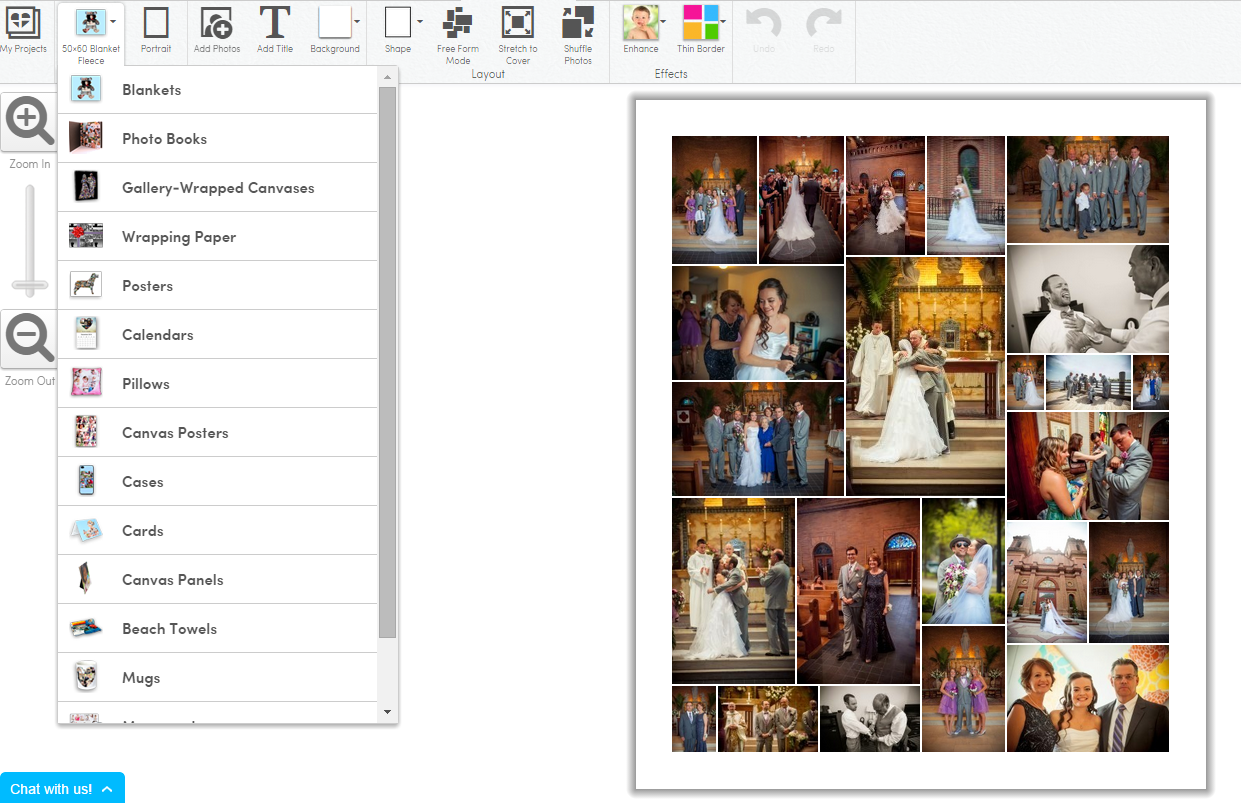
How to make a photo book at Collage.com:

I decided to put together a step by step tutorial for you, just to show you how incredibly easy it is.

Step 1:

Log onto Collage.com and pick the third tab at the top ("Projects").

collage.com


Step 2:

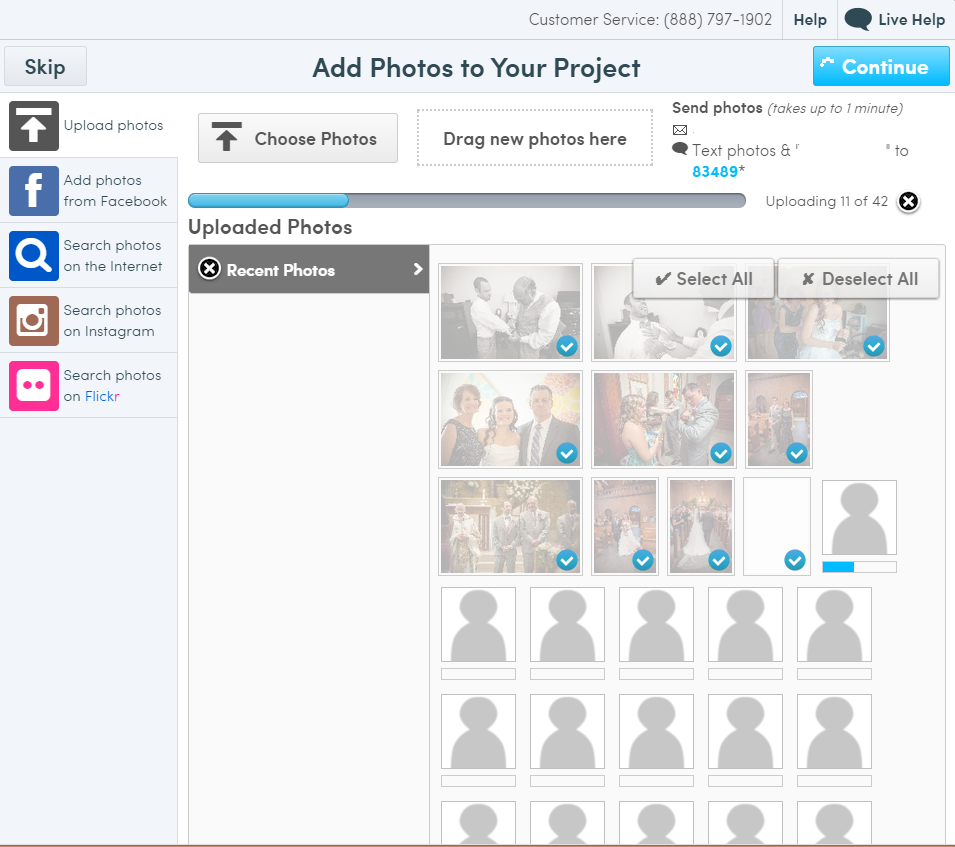
Choose where your photos are stored and upload. You can also text to upload. You'll have a specific code for that but I deleted mine for the sake of this tutorial.

collage.com


Step 3:

Let your photos upload.

collage.com

Step 4:

The second icon from the left is a drop down. Choose photo books (or whatever project you'd prefer).

collage.com

Step 5:

You can keep things super easy and let Collage.com auto-arrange your photos. After that, you can change around the size or order of any photos.

collage.com

Step 6:

Add the book to your cart, pay, and wait for it to come in the mail.

When it does, it's gorgeous.

collage.com

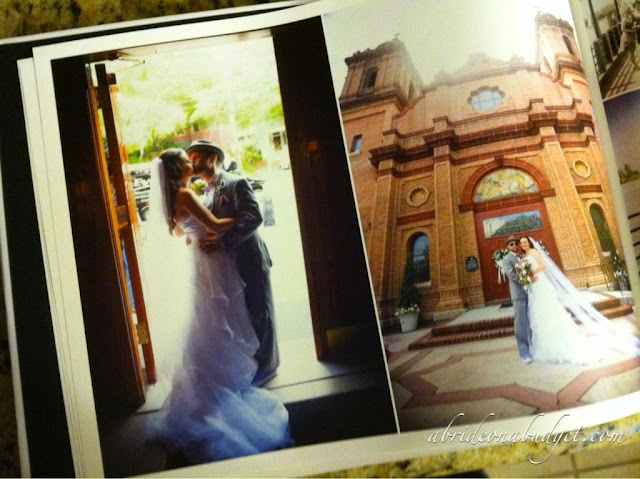
We got a chance to check out an 8.5x11 photo book, which had a hardcover, and a 6x8 softcover book. The pictures came out gorgeous. They were really crisp and clear.

Okay ... let's back up for a minute. Originally, I ordered the book and the photos were bad. You couldn't see anyone's face because they were blurry. And the stones on the church looked like they were currently experiencing an earthquake. Every line was wobbly and the faces look mangled. That was not the book I could give to my mom.

So I sent an email over to Collage.com. See, the thing about the Collage.com is that there is a 100% satisfaction guarantee. I was so unhappy with the book, so I told them. Well, turns out it was poor timing for me. I just happened to have uploaded my photos during a time when something went awry on the website. They sent me a code for a free book and one-day shipping, and I created a new photo book. The new one came out absolutely perfect. I loved it. It was definitely one that my mom would love and could be proud to display.

I loved it so much that I made a smaller book for my grandma.

collage.com

My grandma picked 99 photos for her book, which was a little much for a 20-page book. I made them fit, though. She was happy with how many of the photos were large, although a few photos were a little small so it was hard to see faces. But this book is the perfect size for her to carry with her when she goes to Florida and sees her friends.

You can make a ton of other items at Collage.com, like photo blankets, canvas prints, mugs, shower curtains, and more. I used Collage.com a long time ago to make a canvas print for our apartment, and I love it. So do all our guests. Everyone looks at it and comments on it. So I definitely have faith that you will be happy with anything you order.

Connect with Collage.com: Website | Twitter | Facebook

BRIDAL BABBLE: Check out Collage.com and let me know what your favorite item is.

Sunday, October 19, 2014

Virtual Engagement Party: Picture Frames From Reed & Barton

This post is part of our Virtual Engagement Party. These frames were sent to ABOAB for review.

I have boxes and boxes of photos I took when I was a kid. I had an old school Fisher-Price/Kodak camera when it was modern and not old school. I won bingo on a family camping trip and used that to buy an up-to-date (at the time) camera when I was in middle school (although my friend Allison, who was actually one of my bridesmaids, tried to convince me to use the money to buy a gecko).

And then, for one of my birthdays many years later, my mom bought me a digital camera. And since then, the majority of my photos have lived in social media only.

It's a sad turn we've taken, kind of like how we all just text instead of call each other. I made it a point to make three phone calls in the morning before I sat down to write this post. I also made it a point to print and display our wedding photos because they deserve a home outside of Facebook and Instagram.

reed-and-barton-picture-frame

We were sent two gorgeous frames from Reed & Barton for our wedding photos.

The one above is the Carson 4x6 frame. I anticipated that it would hold my 4x6 photos nicely and had one specifically picked out for the frame, which boasts that it can be displayed horizontally and vertically.  When it arrived, though, I realized that the border of the frame was actually almost 2.5 inches wide -- making it too large to fit vertically in the bookcase in our living room. Of course, the photo I wanted was vertical, so I had to pick a new photo. No worries. Our photographers edited and sent us almost 1,500 wedding photos. I had another to choose.

reed-and-barton-picture-frame

The frame fits perfectly on the shelf I picked. And the photo I picked is a bit more animated than any of the other groomsmen photos. I actually have this huge canvas print of me and my bridesmaids making funny faces at our engagement party. It's on our "funny face wall" (a wall filled with animated photos of our family and friends that just makes my heart so happy when I walk past it). This photo of Pete, his groomsmen, and our ring bearer being animated is the perfect compliment to my bridesmaids photo.

If you look through our wedding photos, you'll crack up. There are so many photos that are just filled with -- oh, what's the word. I want to say happiness, but all weddings are happy. Our photos, they're very candid and just capture everyone having fun. I mean, our wedding photos are probably the only ones that feature the groom posing in a port-a-potty.

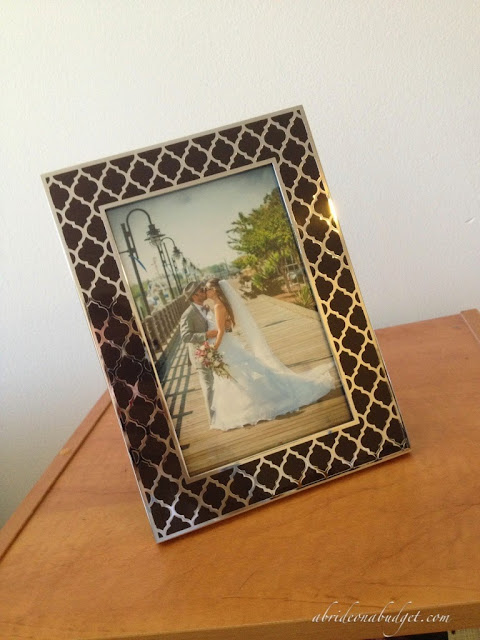
We do have a bunch of very romantic photos to choose from too. And that's what I picked for the Kasbah 4x6 frame from Reed & Barton.

reed-and-barton-picture-frame

The Kasbah frame comes in a trio of colors: chai, mocha, and espresso. I originally wanted the chai (which makes me laugh because I can't stand chai tea) because it was the lightest of the colors. I wanted one where the colors on the photo would pop and the frame would disappear.

Unfortunately, though, the chai frame was out of stock. So I decided, instead, to pick the espresso. It arrived and was absolutely stunning. I was so happy that the chai was out of stock when the espresso arrived.

reed-and-barton-picture-frame

This photo of the frame and photo doesn't even do it justice. It has a nice weight to it, which Pete noticed right away. And it is just beautiful. The light catches the silver and it shimmers. The silver catches your eye and the dark espresso color seems to fade, enhancing the photo. I'm kinda bummed because in the photo above, the colors of the photo look dulled and muted, but in the actual photo itself, they're super vibrant -- and extra so because of the frame.

The way these are set up, one is to my left and one is to my right. I can see them both from my desk, which is a nice way to smile through the workday. That's something that photos existing online-only just can't do.

BRIDAL BABBLE: Which frame is your favorite?